
My approach to web development is practical and project-driven; I develop what I need for the purpose at hand, and learn new skills as I go. While I can develop from scratch, I often start with minimalist templates and focus my effort on structure, interaction, and user experience.
My typical stack is VS Code with HTML, CSS, and vanilla JavaScript, supplemented by custom CSS or Bootstrap when appropriate. I prefer direct coding in VSCode with a Github or direct sFTP publishing pipeline. However, I also work with WordPress when clients need a WYSIWYG editing interface for ongoing updates.
Post-production DOM Manipulation of WYSIWYG eLearning Media
Bridging ID workflows and front-end enhancement under strict constraints
- Category: Web Design, Creative Problem Solving, Javascript coding and libraries
- Organization: Integration Innovation, Inc.
- Project date: 2025
- Considerations: Customer style guide; no server-side scripting; graceful degradation for older browsers, small screens, and offline/webless environments.
Problem
- Contract requirements limited our production tools, and none could fully deliver the modern, interactive UI the customer wanted.
- A post-production enhancement layer existed, but the internal developer maintaining it was overwhelmed by support requests, bug reports, and feature asks from a large ID team.
- Communication gaps (terminology, expectations, and workflows) between developers and instructional staff slowed iteration and made requirements harder to translate into actionable work.
Solution
- A hybrid role was established for an Instructional Designer with web development expertise to bridge the gap between teams.
- Became an expert user of the toolchain, contributed to the code base, and delivered release training to the broader ID team.
- Managed the intake pipeline: collected feature requests, triaged bugs, and synthesized feedback from 100+ Instructional Designers into clear, developer-ready requirements.
- “Translated” concepts across departments to accelerate implementation and reduce rework.
Results
- Faster delivery of interactive features that directly supported instructional objectives.
- Time and cost savings from more efficient tool usage and fewer avoidable support cycles across the ID team.
- Contributed production code for GIF controls, hotspot behaviors, and scientific symbol support—capabilities not previously possible within the client's constraints.
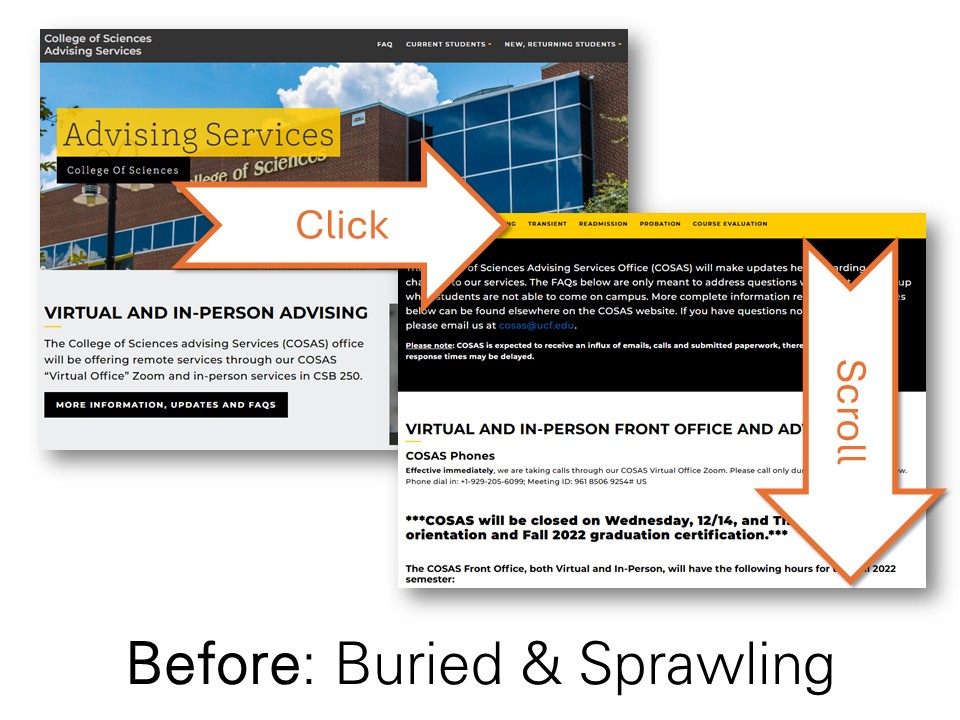
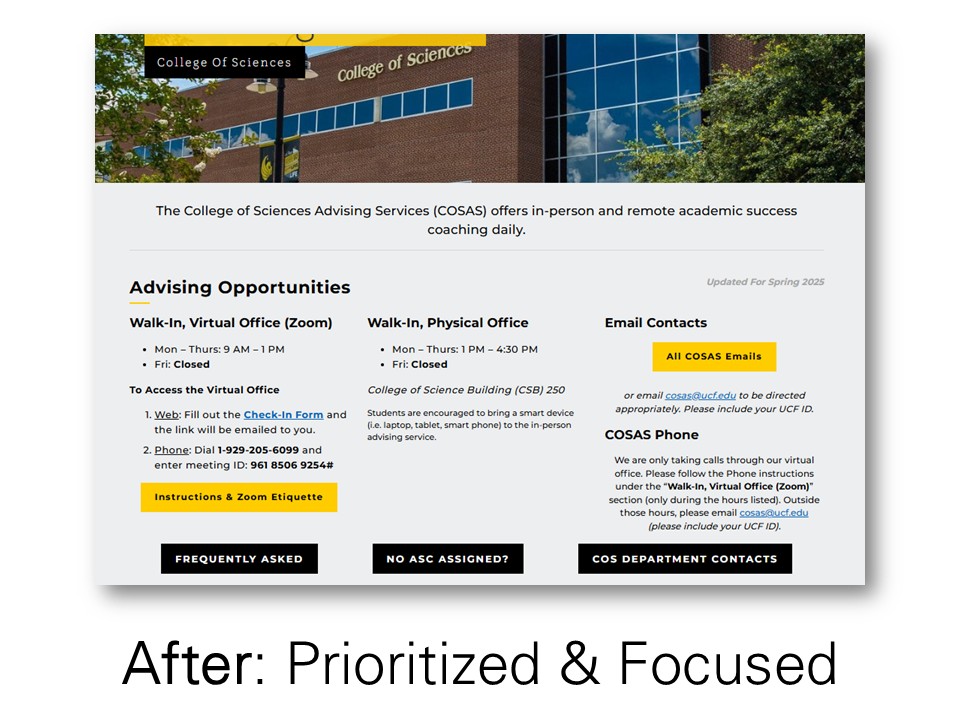
Advising Website First Impression
Effective Updates for Usability & Clarity
- Category: Web Design, User Experience, Accessibility
- Organization: University of Central Florida
- Project date: 2024
- Considerations: University Style Guide adherence, Website governance, Planning & approval processes, Ease of maintenance.
- Project URL: https://sciences.ucf.edu/cosas/
Problem
- Students seeking assistance didn't know where to start.
- Office hours were buried on a subpage.
- Key contact information required multiple clicks.
- Navigation menu included irrelevant links.
Solution
- Surfaced the most-needed information: office hours, email, and virtual meeting link.
- Replaced cluttered descriptions with bold action buttons.
- Simplified visual hierarchy and redesigned navigation into deeper pages.
Results
- Increased traffic to preferred & supported avenues.
- Reduced drop-ins outside of available hours.
- Fewer expressions of student frustration.
- Simplified advising through intuitive website pathways.
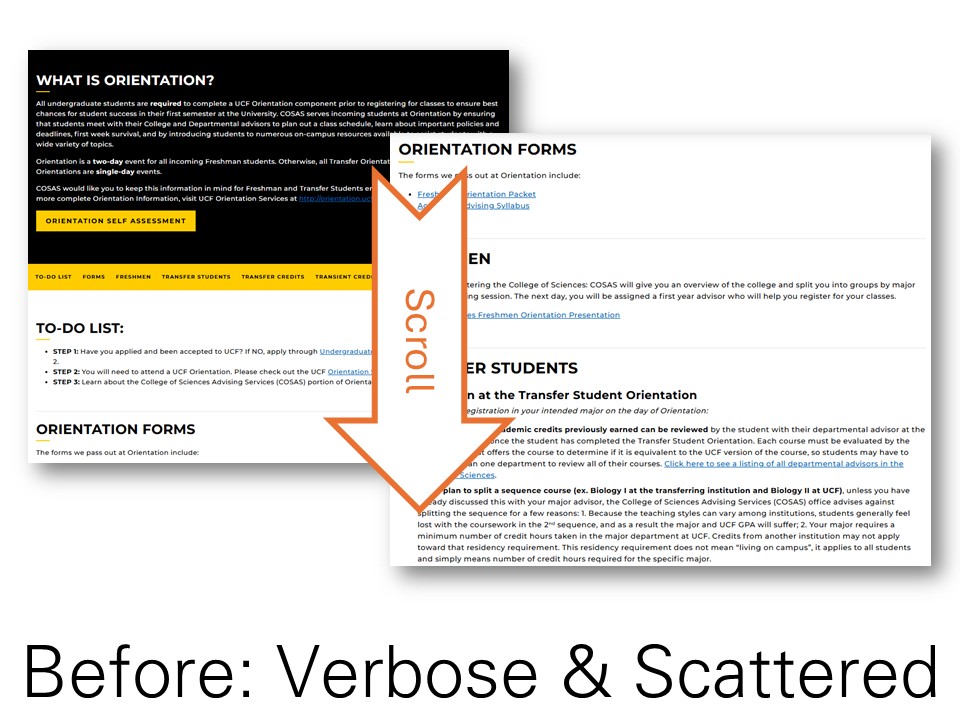
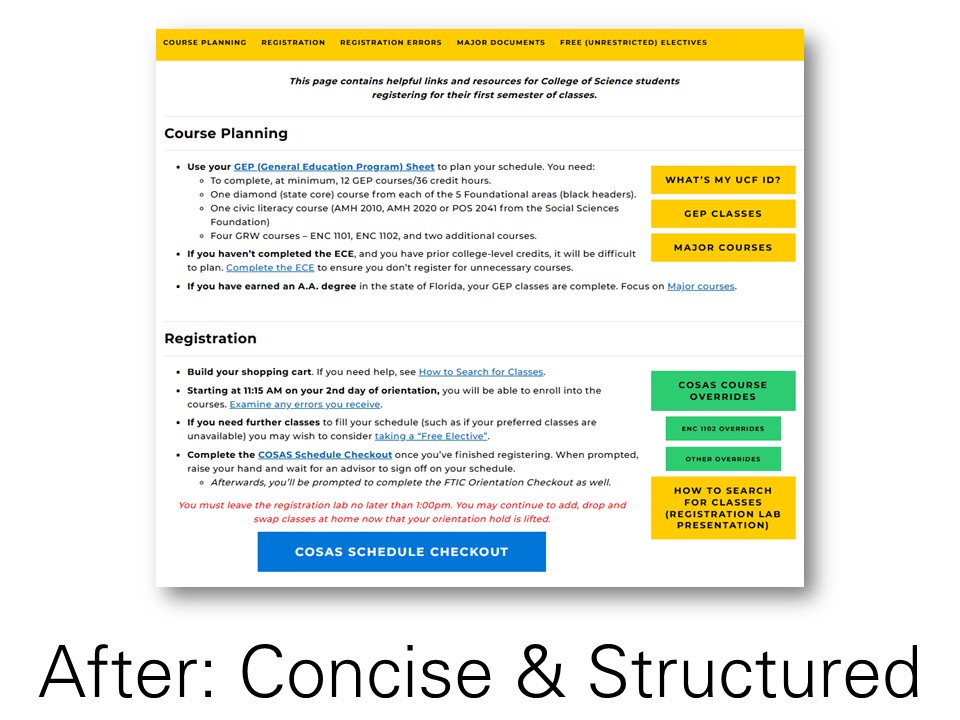
Orientation Website Workflow Redesign
Alignment between User Journey and Physical Realities
- Category: Web Design, User Experience, Accessibility
- Organization: University of Central Florida
- Project date: 2024
- Considerations: University Style Guide adherence, Website governance, Planning & approval processes, Ease of maintenance.
- Project URL: https://sciences.ucf.edu/cosas/orientation-info/
Problem
- Page contained vague and unorganized information.
- Content did not reflect the actual flow of orientation day.
- Contained outdated or unclear resources.
Solution
- Structured content in sequential sections mirroring the schedule.
- Analyzed the resources and questions of highest relevance during each event.
- Updated, sourced, or adapted resources to address each need.
- Replaced cluttered descriptions with bold action buttons.
Results
- Clearer self-service pathways.
- Improved attendee autonomy.
- Fewer repeat questions.
- Reduced confusion stemming from misaligned digital guidance.
- Reduced friction in the class registration lab.


Multimedia Website Integration Project
Demonstrating Media Integration Within a Web-Based Learning Environment
- Category: Graduate Coursework, Web Design, Multimedia Development
- Organization: University of Central Florida (Student Project)
- Project date: Summer 2024
- Considerations: Assignment requirements, Media integration standards, Responsive design, Clean visual hierarchy, Maintainable code structure.
- Project URL: https://rhartshorne.com/summer-2024/lynnenova/multimedia/
Problem
- Assignment required development of a web-based instructional environment integrating multiple media types.
- Project needed to demonstrate structured use of audio, video, and animation.
- Design required responsive behavior and clear navigation.
Solution
- Leveraged an existing web template and adapted its structure to meet project requirements.
- Modified HTML, CSS, and Bootstrap components to support instructional flow.
- Integrated multimedia elements and added light JavaScript for interactivity.
Results
- Fully functional responsive mock website.
- Demonstrated ability to customize templates for instructional use.
- Delivered cohesive multimedia learning experience aligned with assignment objectives.